


|
|
Find and apply wallpapers to your computer quickly and easily.
Click the button below to begin the Papr v1.0.5 installation.
Installing Papr
Click on the downloaded file in the lower left corner of the screen. 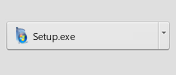

Click on "Yes" to approve the start of installation. 
Click the "Next" button in the installer and follow the instructions.
Click the icon on your desktop, and have fun downloading!

Why use Papr?

- Easy You do not have to worry about the size, Papr returns wallpapers with the perfect size for your screen. You just provide the search terms and click on the wallpaper that you like.
- Quick Do not waste time searching, downloading and applying manually, Papr will save you a lot of time every time you want to exchange your wallpaper.
- Practical You can also save wallpapers to your favorites by organizing them by theme and applying them whenever you want.
How to use Papr?
Download
Download the application by clicking on "Install" above.
Install
Open it and follow the steps of the installer to complete the program installation.
Open
When the installation is finished, the program will open. Type in the search field the desired theme ("nature", for example) and press Enter.
Use
Several wallpaper options will be displayed, click on the one you want and it will be applied. Is not it simple?

Papr
edenware.app/papr · PAD